


Fishing guides are a secretive bunch. Their livelihood depends on finding good fishing spots then taking paying clients to them. If we fish, we know good fishing spots are at a premium. Every fishing guide knows he or she is having a bad day when they and their client, show up at a fishing spot to find someone there before them. I've been on both sides. If you haven't experienced it, trust me. It isn't a good situation.
So, what does this have to do with cyber security? Many fishing guides have websites where you can learn about the their fishing service and book your trip. Fishing guides are also heavy users of Facebook to post pictures of a client's most recent catch.
Guides have quickly learned to take a picture of a client's catch, at an angle so there are no background features that might help identify the location. They understand, every posted picture will be scrutinized for details that give away where that fish was caught.
What can we learn from fishing guides?
Whether we're an individual or organization, most of us have a presence on social media. If we post anything on social media, our text and visual posts contain detail we might not want the internet audience to view. It's advice we've heard hundreds of times but it bears reinforcing. Review each post before you broadcast it. Every day, I view posts with personal detail that shouldn't be broadcast. You do too.
You likely have heard about the new shift in the credit card industry from magnetic strip to EMV chip cards. These cards have a small chip in them that facilitates communication to the payment card company in place of the magnetic strip technology that has been the industry standard for 25+ years. Historically, the motivating factor in large data breaches has been static data associated with payment cards. Once a thief breaks whatever security measure are in place and clones the magnetic strip of unsuspecting card holders that clone can be used over and over again which turn the fruits of the hacker’s labor into cash.
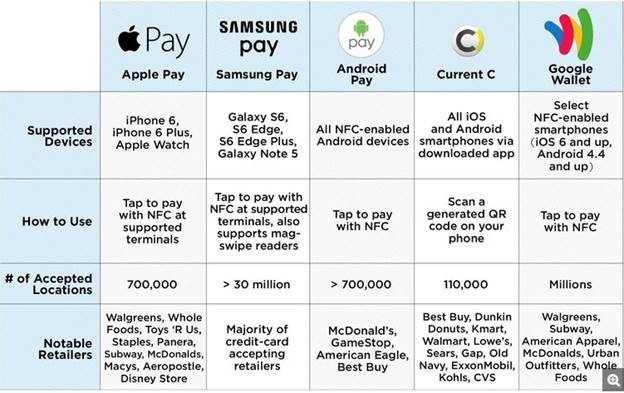
Credit: http://www.tomsguide.com/us/mobile-wallet-guide,news-20666.html
That is about to change once the swipe is replaced with the dip. The major security benefit of EMV is that every time you make a purchase, a new unique transaction ID is used to facilitate the transaction with the retailer. That transaction ID is unique to that sale and will never be used again, making the data retained by the retailer useless to a hacker. This payment model is the same deployed by mobile payment services like Android Pay, Apple Pay, and Samsung Pay. The difference between these three lies in how the information is transferred to the Point of Sale machine but the payment model of unique payment ID numbers is shared among them.
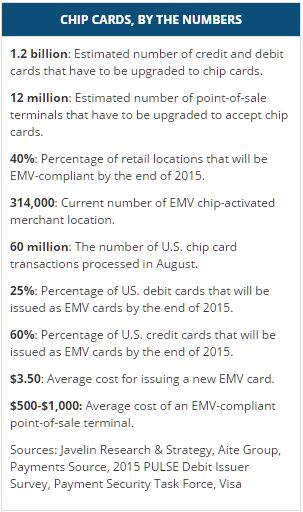
Credit: http://www.creditcards.com/credit-card-news/emv-faq-chip-cards-answers-1264.php
There will continue to be security risks, and EMV is not a cure-all pill. It does nothing to improve the security of online payments and not all retailers will have EMV POS machines at launch, leaving those retailers not only vulnerable, but heavy targets for hackers. Expect breaches aimed at smaller retail operations that do not have the means to upgrade their equipment at launch because EMV enabled cards can still be swiped if a POS machine is not able to process EMV payments. Europe has been using EMV for several years and credit card fraud has dropped by as much 80%, so it is clearly a step in the right direction.
Deloitte and RSA presented a collection of seven articles on risk, covering topics ranging from general business risk to IT specific risks.
As I read the articles, the definition of risk that I learned way back in a risk management class kept coming to mind. Definition: a risk is a potential future event that has a probability and an impact. The probability describes the likelihood that the future event will occur. The impact is either the positive or negative result if the event occurs.
The reason that the definition kept coming to mind is that many of articles seemed to miss some aspect of weighing the probability and impact of a risk as the first step in determining how to respond to the risk.
Several of the articles talk about the need to mitigate risk, and how to accomplish it, as though needing to mitigate the risk is a foregone conclusion. The only forgone conclusion of what should be done when a risk is identified, is to formulate a risk response strategy. One risk response strategy, when the impact of the risk is negative, is to mitigate the risk by lessening the likelihood of the event occurring, or limiting the negative impact that occurs. If the risk results in a positive impact, the strategy can be to increase the likelihood that the risk will occur.
Another risk response strategy is to simply accept the risk and not attempt to mitigate it. The cost of mitigating the risk may be excessive based on the likelihood that the risk event will occur and what the negative impact of the risk is.
For example, I’m aware of a major farm equipment manufacturer that did not have a backup IT disaster recovery site in the late 90s. Their risk analysis at that point in time told them it was too expensive to maintain a backup disaster recovery site based on the likelihood that their primary data center would be completely unavailable for an extended period of time. And if something occurred that took their data center offline for an extended period of time, it was likely that their manufacturing plants would also be impacted in a similar way, removing the immediate need for an operational data center to support them. This company’s Data Center Availability Risk Response Strategy was to accept the risk, not to mitigate it. The point is that risks need to be carefully evaluated and an appropriate risk response strategy formulated. There is not a one size fits all answer to risks and how to deal with them.
How do you handle risk analysis and formulating your risk response strategies?
In my experience as a security engineer, I have noticed that employees are often given significantly more access than needed. This is particularly true at large, enterprise level organizations. At enterprise clients I have worked with, I was responsible for granting this access once a request was approved. All too often I receive requests that clearly have not been investigated, with few, if any, questions asked as to why a user needs the access. Managers may believe themselves too busy or lack the technical expertise to investigate requests and approve them pro forma.
Asking a few simple questions, I have discovered that often users will submit a request for access simply because a colleague in a similar role has it, not based on an actual need. This is a problem—access should only be granted based on need. Even when a user does not have malicious intent, he or she may inadvertently cause chaos within a company’s IT infrastructure in areas they should not be able to access.
The solution is simple on paper, but can be difficult to implement. Managers or those granting access need to take the time to review requests, evaluate them to ensure there is a valid business need, and grant only the requests that meet a defined criteria. The world of cyber-threats is constantly changing, but carefully designed access management policies can help protect your valuable resources.
Overview
“Game of Thrones” fans are very familiar with the Dyre Wolf. I am not, however; referring to the Dyre Wolf that is the blood thirsty animal from the Pleistocene Age. What it is though, is just as hungry and its prey is your money. Researchers at IBM recently released a white paper titled “Inside the Dyre Wolf Malware Campaign,” which describes a sophisticated attack against bank accounts of major corporations worldwide. This campaign was well funded, well planned and executed perfectly. The attackers had a high level of knowledge regarding banking systems and websites. The attack used a diverse combination of attack vectors including spear phishing, malware, complex process injections, and distributed denial of service (DDoS).
The Spear Phish
An email was sent to an employee within the targeted organization. The email referenced an invoice and included an attached zip file. Once the zip file was unpacked it contained what looked like a .pdf document. Most users choose not to have their computer show all file extensions and so a user was unable to see the actual extension of the file—.scr. Once clicked the script, which was actually a piece of malware called UPATRE (pronounced up-a-tree), ran and so began the infection.
First Stage Infection
UPATRE performs a DNS check to determine the public IP address of the infected machine. Then, it contacts a STUN (Session Traversal Utilities for NAT) server to determine the type of NAT in use. It determines if the infected computer is behind a proxy by contacting Google.com and makes contact with its command and control server to download the Dyre malware. Once Dyre is loaded, UPATRE then deletes itself.
Second Stage Infection
The Dyre malware creates a service called Google Update Service to establish persistence on the machine. This service runs when the machine is started. On restart Dyre injects malicious code into the SVCHOST.EXE process before stopping the Google Update Service. Next, Dyre makes connections to several different I2P nodes and establishes encrypted peer-to-peer tunnels to send its information undetected. Then, Dyre hooks the machines browsers in order to steal credentials. It is only looking for credentials for specifically targeted banking sites. If Microsoft Outlook is detected on the machine, Dyre attempts to replicate itself by sending the infecting message to addresses in the contact list.
Dyre uses three different methods to steal credentials. In the first method, if the user browses to one of the targeted banking sites it uses server side injections to create additional fillable fields in order to capture personally identifiable information and two-factor authentication codes. The second method involves routing the infected user’s traffic through a proxy to Dyre’s command and control server where a replica of the banking page is delivered to the user. This fake site also contains the additional form fields used to capture banking credentials. The third method is the most sophisticated. Dyre intercepts responses from the banking website and using its own PHP server it serves code injected responses to the user in real time. This means that the victim is communicating directly with the attackers, live.
For high value targets Dyre has one additional attack method. When the victim attempts to browse to the targeted banking site Dyre injects the page with an error message. The error contains a customer service number to contact. This number is controlled by the attackers. When the user calls to fix their access they are greeted by a well-trained and well-spoken individual who asks the user to provide their credentials and two-factor codes in order to fix their access to the site. Once the attacker has all the information they need to access the account they then tell the user to wait 10 minutes for the system to update before attempting to log back into the account. It is during this time the attackers log into the account and transfer large sums of money, values between $500,000 to over $1,000,000 have been reported.
The DDoS
Once the attackers complete the transfer they issue a DDoS attack against the targeted organization. Researchers suspect that this serves to distract the organization, prevent the victim from logging into the banking site to discover the transfer, and to cause additional financial damage to the organization.
How can you prevent this?
First, organizations should strip executables from e-mail attachments. Additionally, executables should be stripped from archive files like .zip. Next, organizations should ensure that their antivirus products are updated regularly. Organizations should also prevent executables from running inside temp directories. This can be accomplished using Group Policy Objects in Active Directory. Infected machines should be rebooted after remediation to prevent Dyre from running in memory. Two-factor authentication should be used whenever possible, especially for internet banking websites. Lastly, user education is important. Users should regularly receive training regarding what is normal to see in the work environment, what actions should or shouldn’t be taken, and where and how to report anomalies.
Archetype SC’s security team is expert at helping companies navigate the complicated world of IT security and prevent attacks like the Dyre Wolf. If you have concerns, give us a call. Archetype SC, we do complicated.
Application whitelisting (AWL) is a technology that has been used in the security industry for a long time but is not yet widely accepted in enterprise workstation environments. AWL is the opposite of blacklisting which is the model used in most antivirus software today. Traditional antivirus looks for malicious files by fingerprinting files on the system and checking those fingerprints against a registry of known malware (the blacklist). Antivirus also looks at other variables and file behaviors to decide whether an intervention is needed. That intervention is the antivirus adding that file to the local blacklist. Application whitelisting is different.
Whitelisting operates on a no trust, “default deny” model which does not allow any code to run on the system unless it has been explicitly added to the list of executables known to be NOT malicious. With whitelisting software becoming more advanced and enterprises growing wearier of being attacked this technology is on the rise. If you are not whitelisting at least your critical enterprise servers, you should be. Most industry experts would agree that deploying whitelisting software like McAfee Application Control is the single best way to secure an endpoint from being attacked. The reason every server, workstation, and the mobile device does not use this technology is that it needs to be properly managed.
Deploying a whitelisting program in production is a daunting task that will be met with skepticism throughout the enterprise because people generally do not like to be told what they can and cannot run on their workstations. Getting management support and developing well thought out policies to deal with the inherent issues that will come up once you go live is vital.
Starting a pilot program on enterprise servers that generally do not change much is a great place to start. The way AWL works is you either take a snapshot of a system and all of its executables to create your whitelist or you can use the corporate gold image if one exists. The next step is to turn on the technology in audit mode to allow time for establishing a baseline.
This step allows changes to be made to the system but logs them for review. Generally, 2 – 4 weeks is a good amount of time to get a good picture of what the systems normal behavior looks like. The final step when you lock down the system is establishing policy to decide what happens when the end user tries to execute a program not on the whitelist. There should be a review team able to make decisions in a reasonable amount of time. Every successful AWL deployment will have a dedicated team to deal with approval requests and the management overhead. At ArchetypeSC we have experienced professionals that can give your enterprise the upper hand against the persistent threats attacking networks constantly. When a hacker gains access to a system they need to run tools to successfully achieve their objective. If the tools aren’t able to run because of a whitelisting policy, then the chances of your enterprise having a breach have been drastically reduced.
Not too long ago most people were unaware of how valuable their personal data was and the impact it could have on one’s life when it fell into the wrong hands. All too many people can say they have firsthand experience with the rise in the past 10-15 years of identity theft. Simply being aware of the existence and risk of identity theft can greatly reduce a person's risk of falling victim. Proactively making people aware of the risk they face, often unknowingly, can also reduce their exposure to identity theft.
This is interesting, but you may be wondering why I am writing about this on Archetype SC's IT security blog. When you look at the old model security teams, it involved waiting for something to break then fixing the issue.
A proactive mindset takes the approach to anticipate and solve problems before they arise. In today’s world, with the vast amount of security applications and one stop shop providers, it is incumbent on the provider to provide updates with fixes, both proactive and reactive. With that being said, security teams still play a crucial role in the sector by assessing where the next attack going to happen and how to mitigate them before they take place. By taking a proactive approach toward your security and systems you can fix things before they have the chance to break.
If you need help securing your infrastructure or would like a proactive security assessment, contact the team at Archetype SC. Archetype SC: we do complicated.
In this edition of our “Securing Your Windows Infrastructure” series, I’ll be talking about some great free tools offered by Netwrix. Netwrix was founded in 2006 and offers a comprehensive suite of commercial and free security tools, all focused around increasing visibility into the changes made to your Windows environment.
Among their free tools, you can find Netwrix Change Notifier for Active Directory, Netwrix Effective Permissions Reporting Tool, and Netwrix Change Notifier for File Servers. The two change notification applications should be considered essential in any organization where multiple people have administrative access to Active Directory and member servers, and the permissions reporting tool will increase visibility into the rights that have been granted to a user throughout your infrastructure.
Netwrix Change Notifier for Active Directory will give you “Complete Visibility into Who Did What, When and Where in Your Active Directory”. As with all of the freeware software offered by Netwrix, there are some limitations. Without a license you will not see who made a change, but you can still gain insight into the changes made in your environment, roughly when the change was made (based on when the report was generated), and which objects were affected.
Netwrix Effective Permissions Reporting Tool is a new freeware offering with no commercial counterpart. Using this application, you can scan your servers for the rights held by a specific user. After the scan is complete, you will be presented with a report that clearly shows the objects the user has permissions to, their level of access, and via which group(s) the access is gained. At this point, the tool is good for one-off scans or periodic audits, but I’m hoping to see a more feature-full commercial version in the near future.
Lastly, Netwrix Change Notifier for File Servers is very similar to Netwrix Change Notifier for Active Directory, but as you may have guessed, it targets file and folders, detailing changes to both permissions and additions and deletions to the file system. As with Netwrix Change Notifier for Activec Directory, you must upgrade to the commercial version to see who made the change and when.
If you weren’t familiar with Netwrix, I hope this quick introduction to a few of their most popular products was helpful and will give you a new level of insight into the changes made and permissions in your Windows environment. As always, feel free to contact Archetype SC at any time for assistance with auditing, Windows security, or any of the number of other services we offer.
The InfoSec community has seen a rise in attention grabbing names for security vulnerabilities over the last couple years like Heartbleed, Freak, Shellshock, and now the latest android vulnerability Stagefright. The Stagefright exploit is different though, its name is derived from the media engine baked into android OS since version 2.2. The Stagefright engine is built into the application framework of android making it a part of your android OS no matter what country you live in, wireless carrier you use, or what brand of phone you buy. It is estimated there are 950 million devices vulnerable to a Stagefright attack.
The most alarming issue about this exploit is that it can be executed with no end-user interaction. An attacker simply has to send an mms message with malicious code written into a video and the device automatically begins to process the code, setting the attack in motion. Further complicating matters is most manufacturers default settings which are set to auto-retrieve mms messages. The user may not even know they were attacked because after the exploit gains root access of the phone the message is deleted but the malicious code stays.
The Stagefright media engine runs with system privileges on roughly 50 percent of the affected devices making it easy to gain root access to the device. Gaining root access on an android phone is the holy grail of exploits and the damage that can be caused is only limited by the attacker’s imagination.
Android is an open source OS which some might say makes it more secure while others would argue the opposite. The security architecture built into system applications in android take the sandbox approach. Most system apps are designed to be contained within themselves so attacks like the Stagefright exploit are not possible. This brings up the question of why the Stagefright engine has access to the internet and can be executed without the user’s knowledge. The answer is the DRM (Digital Rights Management) copyright control technologies that have been implemented over the last decade have required media players to make sure the content is being played legally. The technologies used to protect the content often require media players to check in via the internet, leaving a door open for malware.
Google has already began patching its Nexus line of phones and tablets with Samsung following as well. The inherent problem with android OS is that it is segmented into thousands of different variations of devices and carriers which makes patching a security hole like this a difficult task. Carriers like AT&T and Verizon control the software updates that get pushed out to their customers further complicating the matter. If there is a silver lining in this exploit being brought forth it is that Google and Samsung are going to begin delivering monthly security updates to devices. This is a step in the right direction for mobile device security.
Here is how to protect yourself from falling victim the Stagefright exploit:
Android Kitkat – Open the messenger app and in the settings menu select “block unknown senders”
Android Lollipop – Open the messenger app and turn off Auto-Retrieve for multimedia messages.
Black Hat, the organization that has been providing the IT industry with the latest in security research, development and trends for the better part of the last two decades, has done it again. Black Hat USA 2015 has come to a close. In traditional Black Hat fashion, researchers have left the security world buzzing about newly discovered exploits and vulnerabilities. These vulnerabilities cover the gambit of technology and range from new malware to vehicle hacking.
Malvertising (malicious advertising) has been the leading delivery method for malware by cybercriminals this year. The use of malvertising has increased by 260%. Malvertising is difficult to distinguish from legitimate banner advertising and has become a major concern. Many enterprises still struggle with end user education regarding e-mail phishing schemes. With the rapid growth in malware delivery via malvertising links enterprise will struggle once again to educate users and mitigate threats targeting both enterprise and BYO devices.
Researchers had a good time with Android this year reporting on two major vulnerabilities affecting nearly all versions of the platform. Stagefright, a vulnerability many are familiar with by now was the most alarming, hence the name. Basically, Stagefright is a mechanism (libStageFright) embedded in the Android OS that helps the system process video sent via MMS or Google’s Hangouts platforms. libStageFright is responsible for pre-loading video sent via MMS to improve the user experience. However, cybercriminals could embed an attack in the video that would in turn, launch automatically. This revelation has led smartphone manufactures and Google to lean towards monthly security updates (thank you). If your device is vulnerable and unpatched you can turn off the MMS auto-retrieve function. Another flaw in Android, though more complex to exploit, lives within the mobile Remote Support Tool (mSRT) apps. Basically, if a device is infected with malware that has mSRT permissions it leaves the device prone to be taken over by an attacker.
New cloud based man-in-the-middle attacks were presented. These attacks find cloud synchronization services (Google Drive, Box, Dropbox, etc) as their delivery method. While your cloud account credentials may remain secure, the tokens used to establish those sessions can easily be hijacked. Once attackers have the tokens it is an easy task to compromise files while they are being synced. In addition, cloud sync can be used to exfiltrate data and even send command and control communications.
Researchers also demonstrated how networked printers can be used to send data via radio signal a far enough distance to be compromised by an attacker. It is done by quickly power cycling the I/O pins on chips inside the printer. A signal can be generated that is strong enough to be picked up by receivers outside the building.
Additional research provided insight into vulnerabilities in internet connected vehicles using internet-aware Programmable Logic Controllers. SquareTrade card readers are vulnerable to an encryption bypassing hardware based attack. Vulnerabilities were discovered in Linux powered firearms allowing unauthorized control and discharge.
If you missed Black Hat USA 2015, more details about the above vulnerabilities (and others) can be found throughout various websites and in 6-9 months all research documentation will be released and can be found in the Black Hat Archives at https://www.blackhat.com/html/archives.html.
In light of all new vulnerabilities and research presented it is as important as ever to remain diligent and ensure that your security team is knowledgeable and well trained in identifying anomalies in your enterprise environment. If you would like an assessment of security conditions at your company, need help implementing solutions to risks, or are trying to recover from an attack, the team at Archetype SC is ready to help. Regardless of your size, our team of experts will help you establish a safer and more secure digital presence.
Welcome to the second installment of Securing Your Windows Infrastructure. In the previous article, I talked about Domain and Server Isolation, a technique that can be used to isolate domain-joined systems from untrusted hosts and optionally to require encryption to and from systems containing more sensitive or confidential information. Today, I’ll be reviewing another low-effort, high-impact method that can dramatically increase the security of your Windows systems.
Microsoft’s Security Compliance Manager is a free download that can help you secure many Microsoft products, including all recent versions of Windows Server. For each product, there are pre-configured settings that combine both Microsoft’s best practices and industry standard settings that can be pushed out to systems using Group Policy, or to standalone (non-domain-joined) systems as of SCM version 3.
In addition to having support for Microsoft’s most popular products, Microsoft SCM includes baseline security configurations for the various roles a server may need to perform. For instance, there are multiple policies for Microsoft Exchange Server 2010 SP2, including CAS, Edge, Hub, Mailbox and UM services. For Windows Server 2012 R2, one will find specific policies for Domain Controller and Member Server compliance, as well as recommended values for account lockout and password configuration settings.
Once a product and role have been selected, an administrator is able to learn more about each of the security settings included in the policy. Along with each is a severity rating, a detailed description of the setting, a description of the vulnerability being addressed, and the potential impact that changing the setting could have on your environment. Using this information, each setting can be configured according to the security requirements of the individual server or enterprise.
After a suitable policy has been created, the easiest way to deploy it is using your Group Policy infrastructure, although other export formats exist including Excel (for documentation), SCCM and SCAP. Simply export the policy from SCM and import it into a new GPO. You will need to use caution when deploying a new security policy as the more restrictive settings may cause problems in your environment. A safe approach is to test a policy first in a QA environment, moving up to Dev and later to production. Another safe option is to deploy the policy only as new servers are deployed, so as to not break any systems in production.
For help avoiding common mistakes when using this tool in your environment, please contact our experienced team by using the form on the contact page of this website or by giving our office a call. Good luck, and stay secure.
Everyone makes mistakes, that’s right, I said everyone. The most important part of making a mistake is embracing the opportunity to learn from and adapt your behaviors and processes once a mistake is made. User education on computer security is, without any doubt, one of the most (if not #1) difficult and important functions of your IT Security Team. The bottom line is, most users of technology understand that technology is by function only. Meaning, many users are experts at sending emails, using Facebook and social media, or creating and sharing all of those wonderful Microsoft Office documents we all know and love. However, most users are not aware of the dangers of malicious scripts hidden in Office macros or how URLs can be made to look like a known site but actually send users to malicious sites designed to distribute malware and steal information.
But is user-education the solution to preventing data-loss in your organization? I suppose the answer is both “Yes” and “No”. Bruce Schneier (CTO of Resilient Systems) said, “I too have tried educating users, and I agree that it’s largely futile”. Part of the problem with user education is finding a balance of understanding. There are people in your environment that just don’t understand how technology works, and don’t want to. This may be generational or just a learned behavior but it is difficult to overcome. That being said, many of the people in your environment are able to absorb some of the technical knowledge required to use technology as safely as possible. The key is finding a balance between user education and the implementation of technologies that protect the environment in areas where education continues to fail.
In order to find that balance the IT Security Team needs to rely on metrics. Metrics can come from security appliances reporting on incidents or from user surveys and town hall meetings. Keep track of the gaps, the points where both technology and user training seem to be failing, and work together to find a solution. A common gap in many organizations is removable media protection. Not just portable hard drives and flash media but also DVDs and CDs too. Technologies exist to block and monitor these devices. Protect your environment from those promotional CDs that are embedded with rootkits and botnets by not allowing users the opportunity to forget their annual security training. Simply remove the “user choice” variable from the equation.
Of course in many environments the “push back” that comes from taking away functionality can be swift and harsh. Again, this is where the need for balance arises. In order to be profitable in business, there must always be some risk that is simply identified and accepted. The IT Security Team and Executives must work together to identify and mitigate or accept the risks.
So are users the weakest link in the Security chain? There are definitely arguments for both yes and no. User training and education is not going to go away. It is also important that as Security Professionals we make our servers and end-points as secure as possible regardless of who sits in front of them. At Archetype SC our Consultants and Engineers are ready and willing to help your organization design or improve your end-user training program. Let our skilled professionals analyze the gaps in your environment and help you plan for and implement technology and training modules to increase your organizations security posture while allowing the business to function optimally.