
Why SID History Matters for Business Security

7 minute read
Share this:
By Jason Langley
Security Engineer

How confident are you in your security—right now? If someone left your company last month, could they still access your legacy file shares? If you’ve merged with another business, are you sure there aren’t hidden permissions trailing behind old accounts?

Many organizations focus on passwords, firewalls and user training but overlook a quiet risk hiding in plain sight. One of the most overlooked culprits behind lingering access is SID History, a legacy attribute in Microsoft Active Directory that preserves old access paths even after users, roles and systems have changed. If you’re not sure whether SID History is lurking in your environment, our Identity & Access Management services help you understand who has access to what. This article explains what SID History is, why it was designed to support business continuity, and how unmanaged entries can quietly undermine even your most well intentioned security strategies.

What is SID History?

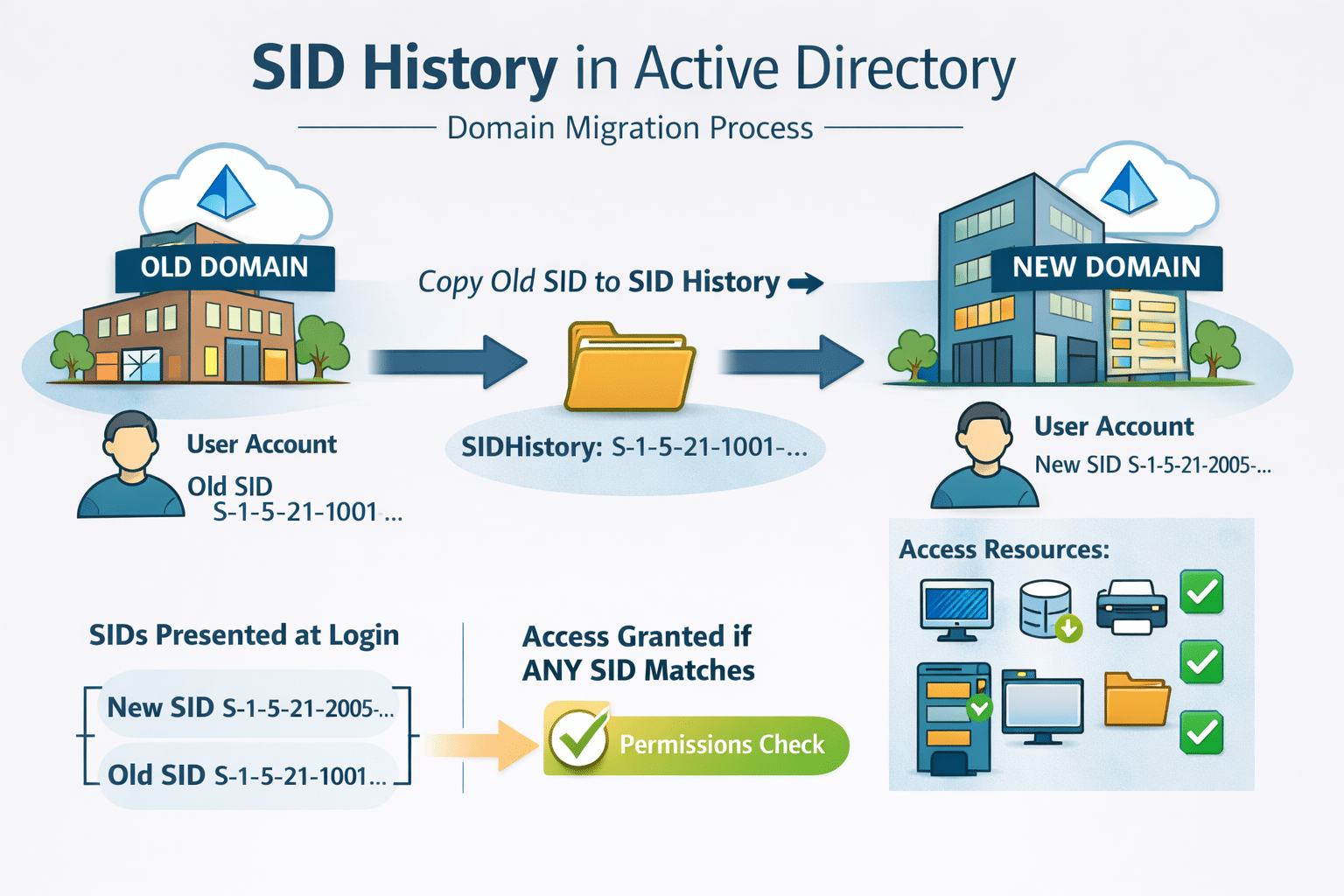
Active Directory assigns every user, group and computer a unique Security Identifier (SID). You can think of a SID as your digital key card: it’s how the system knows who you are and decides which doors—files, apps and resources—you’re allowed to open. SID History is a special field on your account that stores any previous SIDs. It’s like keeping old key cards on the same key ring: even after you’ve been issued a new card, those older keys can still open certain doors if no one has changed the locks. When you log in, Windows checks both your current SID and the entries in your SID History, which means you may still have access to older file shares, applications or systems that trust those previous IDs. That keeps you productive, but it also means unused keys can pile up.

Why SID History Exists

SID History isn’t a hacker tool—it’s a feature to keep your business running. Organizations change constantly: promotions, department moves, reorganizations and acquisitions. Without a safety net, each change could break your access to critical files, apps and shared resources. SID History provides that safety net. By carrying forward old SIDs, it lets you keep working while IT quietly updates permissions behind the scenes. Legacy file shares, line of business apps and older SharePoint sites can still recognize your “old” identity, so you avoid surprise lockouts and last minute helpdesk tickets. But this convenience should have a time limit; Microsoft recommends removing SID History once your migrations or transitions are complete.

Old Keys, New Risks

The same feature that keeps you productive can quietly turn into a liability. If your SID is your current key card, your SID History is the stack of old cards that still work in doors no one remembers to re-key. It’s helpful during a merger or restructure, but if those old SIDs never get cleaned up, you end up with invisible ways into sensitive systems. That’s where the risk lies: offboarding gaps where former colleagues still have access, leftover rights buried deep in folder inheritance, accounts that look ordinary but still carry historic high privilege SIDs, or forgotten service accounts with more reach than anyone realizes. Attackers can exploit these hidden pathways; adding a powerful SID to a regular user’s SID History can make them an admin without adding them to any admin group. As security specialist Sean Metcalf warns, SID History is “one of those quiet attack surface expanders—the longer it’s left unmanaged, the more invisible permissions creep in." In other words, an account that appears low risk on paper may have domain level power because of legacy SIDs nobody is watching.

Best Practices & Next Steps

When it’s doing its job, SID History is invisible—which is exactly why it needs your attention. Treat it like a set of legacy keys: keep only what you truly need to keep your business running, and retire the rest before it becomes someone else’s opportunity. To manage SID History effectively, make it part of your regular identity and access hygiene:

  1. Inventory which accounts (users, groups and computers) still have SID History values.
  2. Time‑box the use of SID History—set a clear end date for those legacy SIDs.
  3. Plan safe removal with backups, testing and coordination with application and data owners.
  4. Enforce least privilege after cleanup, ensuring current roles match current access.
  5. Monitor and audit any changes to the SID History attribute going forward, leveraging 24/7 monitoring from our Network Security team.

Archetype SC can help you with an Active Directory & Identity Health Check—a deep review of identity hygiene and access controls—through our Identity & Access Management services. We also offer a Security Risk & Vulnerability Assessment (SRVA) and incident‑readiness report to uncover and close the gaps legacy permissions leave behind. Think of SID History as a tool with an expiration date: if you never collect the old keys, you’re expanding your attack surface.

Take control of your security today!

The cybersecurity experts at Archetype SC specialize in helping businesses understand and manage the risks associated with modern technology. Help lock down your most precious assets today with a variety of cybsecurity solutions including multi-factor authentication, identity governance and more! Contact us today for a free consultation.

cross linkedin facebook pinterest youtube rss twitter instagram facebook-blank rss-blank linkedin-blank pinterest youtube twitter instagram